A mini gaming PC is one of the nicest things you can put on a desk. It’s tidy, it fits under a TV, and it goes to a mate’s place in a backpack. But shrinking a gaming computer means making compromises somewhere, usually in cooling, noise, price or what you can upgrade later.
We build full-size towers, so we’ll be clear about our bias. That said, there are good reasons to go small, and we’d rather you end up with the right machine than the one we happen to sell. Here’s how the two really compare.
What counts as a mini gaming PC?
There are really two kinds, and they’re very different:
- Small form factor PC builds. These use standard desktop parts squeezed into a compact case, typically 5 to 20 litres, built around a Mini-ITX motherboard. They can hold a full desktop graphics card.
- Mini PCs. Shoebox-sized or smaller, often using laptop-style processors with graphics built into the chip. Great for everyday use and lighter games, but most can’t take a separate graphics card.
A typical mid-tower case, for comparison, is around 40 to 50 litres. The Mini-ITX standard squeezes a motherboard down to just 17cm square, which is what makes the smallest gaming builds possible.
Performance: can a mini gaming PC keep up?
A well-built small form factor PC with a desktop graphics card can match a tower in games, at least for a while. The difference shows up over a long session. Small cases trap heat, and when components get too warm they slow themselves down to stay safe. A tower with plenty of airflow holds its top speed for hours.
Mini PCs with built-in graphics are another story. They’re fine for esports titles at 1080p on lower settings, and the newest high-end chips with large integrated graphics have surprised a lot of people. But for demanding games at high settings, a separate graphics card still wins comfortably, and those chips aren’t cheap.
Cooling and noise
This is the biggest trade-off. Small fans have to spin faster to move the same amount of air, and faster fans are louder. A mini gaming PC under full load often sounds noticeably busier than a tower with large, slow fans doing the same job.
Case design matters a lot. Some small cases are excellent, with clever airflow and room for a decent cooler. Others look beautiful and run hot. Read reviews that measure temperatures and noise, not just the ones with nice photos.
Graphics card limits
Modern graphics cards are big. High-end models can be over 30cm long and take up three or four slots. Many small cases only fit shorter, slimmer cards, which can rule out the most powerful options or force you into a specific model. Always check the case’s maximum graphics card length, height and thickness before you pick a card.
Upgrades and repairs
A tower is easy to work in. There’s room for your hands, the cables have space and you can add drives, fans and memory without taking half the machine apart. Most Mini-ITX boards have only two memory slots and fewer M.2 slots, so storage and memory upgrades are more limited.
Small form factor PC builds also tend to use compact SFX power supplies and specific coolers. They’re good parts, but they cost more and there’s less choice. If you like tinkering, a tower is simply more relaxing to live with.
Price
Going small usually costs more for the same performance. Mini-ITX motherboards, SFX power supplies and good small cases are premium parts. You’re paying for the engineering it takes to fit everything into less space, which is fine, as long as the size is genuinely worth it to you.
When a mini gaming PC makes sense
- You’re short on space. A small desk, a shared room or a lounge setup where a tower would look out of place.
- You move it around. LAN parties, a holiday house, or uni and home.
- It lives under the TV. A mini gaming PC in a TV cabinet makes a brilliant couch gaming machine, with good ventilation around it.
- You love the look. Small builds are genuinely satisfying, and that’s a perfectly fair reason.
When a tower is the better choice
- You want the most performance for your money. Towers use standard, affordable parts.
- You want it quiet. Bigger fans, slower speeds, less noise.
- You’ll upgrade later. More slots, more room, more choice.
- You play long sessions of demanding games. Better cooling means steady performance hour after hour.
Questions to ask before you buy small
- How loud is it under load? Look for reviews that measure noise in a real game, not sitting idle on the desktop.
- Which graphics cards fit? Check the exact maximum length and thickness, not just “supports full-size cards”.
- What power supply does it use? A known-brand SFX unit with comfortable headroom above the graphics card’s needs is ideal.
- How do you get inside? Some cases need several panels and brackets removed before you can reach anything.
- What’s the warranty? Small systems are fiddlier to repair, so good support matters more.
If a seller can’t answer those clearly, that tells you something too.
Making a tower feel smaller
If you’d prefer a tower for its cooling and upgrades but space is tight, there are ways to make it disappear. Put it on the floor beside the desk on a small stand, use a monitor arm to clear desk space, and route cables down the back of the desk. Our gaming setup guide has more ideas for fitting a full-size PC into a small room.
A mid-tower case with a clean design and lights set to a single colour, or switched off, also looks a lot less intrusive than the RGB-everywhere builds you see online.
Our honest take
For most people, a well-ventilated mid-tower gives the best mix of performance, quietness, price and future upgrades. A mini gaming PC is the right answer when space or portability really matters, and a great one when it’s done properly. Just go in knowing what you’re trading for the smaller size.
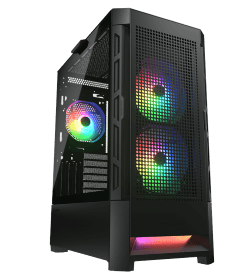
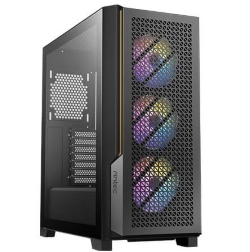
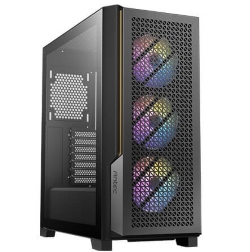
We build towers, and every one of ours is assembled for airflow and tested under load before it ships. These are a few of our most popular, with more in our gaming computers range:
Small form factor PC questions
Is a mini gaming PC good for 4K gaming?
It can be, with the right case and graphics card, but expect more fan noise and higher temperatures than a tower running the same parts.
Do mini PCs overheat?
Poorly designed ones can, especially in a closed cabinet. Give any small form factor PC open space around its vents and keep the dust filters clean.
Can I upgrade a mini gaming PC?
Usually, but with limits. Graphics card size, memory slots and power supply wattage all restrict how far you can go.
Is a smaller PC more power efficient?
Only if it uses lower-power parts. A small case with a big graphics card draws just as much power as a tower with the same card.
What’s the smallest case that fits a full graphics card?
Some cases around 10 litres take full-size cards, but they’re tight builds. Around 15 to 20 litres is a more comfortable size for cooling and noise.
Are mini PCs good for everyday use?
Very good. For web browsing, office work and streaming video, a mini PC is quiet, efficient and takes up almost no room.