GAMING COMPUTERS
GeForce Gaming PC
RTX 5060 + i5-14400F
- CPU
- Core i5-14400F
- GPU
- 8GB RTX 5060
- RAM
- 16GB
- SSD
- 1TB NVMe
$2,249 $2,999
BLACK FRIDAY EARLY ACCESS
25% off every PCTaken off the full price. Ends Cyber Monday.
ENDS IN
Shop early access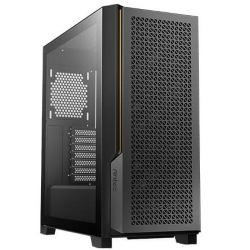
PHOTO EDITING COMPUTERS · 1080P HIGH REFRESH
BLACK FRIDAY EARLY ACCESSYou save $1,125 · ends Mon 30 Nov, 11:59pm
A PC for video editing built around a 20-core Intel Core i7-14700KF, NVIDIA GeForce RTX graphics, 32GB of RAM and two fast Kingston SSDs (1TB KC3000 plus 2TB), with 240mm liquid cooling and a quiet professional case.
Exactly what goes into this build.
Every component, and why we chose it. Tap a part for the details.
 CPU
14th Gen Intel Core i7-14700KF, 20 cores, up to 5.6GHz
 RAM
32GB dual channel RAM, upgradable to 64GB or 128GB
 2ND SSD
2TB Kingston NVMe M.2 Gen 4 SSD
 OPERATING SYSTEM
Microsoft Windows 11 Home
 GRAPHICS CARD
NVIDIA GeForce RTX 5060
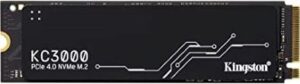 SSD
1TB Kingston KC3000 NVMe Gen 4 SSD
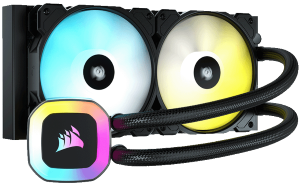 CPU COOLING
ASUS / Corsair 240mm liquid cooling
This PC for video editing is set up the way editors actually work. It has a 20-core Intel Core i7-14700KF for fast exports, an NVIDIA GeForce RTX graphics card for hardware-accelerated effects and encoding, 32GB of RAM, and two fast NVMe drives: a 1TB Kingston KC3000 for your system and apps, and a 2TB Kingston SSD for projects and media.
It runs quietly thanks to 240mm liquid cooling and a professional high airflow case, and it is built and tested in Melbourne for $4,500.
Editing video puts pressure on every part of a computer. The processor handles decoding, effects and exports. The graphics card accelerates playback, colour work and encoding. Memory determines how smoothly long timelines play, and storage speed affects how quickly footage loads and scrubs. A good video editing PC balances all of these, rather than spending everything on one part.
That is how this system is designed: a many-core processor, an RTX graphics card with NVIDIA's encoders, enough memory for 4K projects, and separate fast drives for your system and your media.
The Intel Core i7-14700KF has 8 performance cores and 12 efficient cores, 28 threads and boost speeds up to 5.6GHz. In editing software that means smoother timeline playback with effects applied, quicker renders and faster exports, especially for H.264 and H.265 delivery. If you regularly export long projects or work in 6K and 8K, you can upgrade to the 24-core Intel Core i9-14900K.
Cooling matters for long exports, so we fit an ASUS or Corsair 240mm liquid cooler. It keeps the processor at full speed for the whole render without the fans getting loud.
Adobe Premiere Pro, After Effects and Media Encoder make heavy use of both the processor and NVIDIA graphics. This Premiere Pro PC uses NVIDIA's CUDA cores and NVENC encoders to speed up playback, Lumetri colour, effects and exports, while the 20-core processor handles decoding and rendering. It is just as good for DaVinci Resolve, CapCut, Vegas Pro and Avid Media Composer.
The standard GeForce RTX 5060 is a great starting point for 1080p and 4K editing. If you do a lot of colour grading, noise reduction, effects work or 3D titles, upgrade to an RTX 5060 Ti, RTX 5070, RTX 5070 Ti or RTX 5080 for more performance and video memory. Professional NVIDIA RTX PRO 2000 Blackwell and RTX PRO 4000 Blackwell cards are also available for certified workflows.
Two drives are better than one when editing. The 1TB Kingston KC3000 NVMe Gen 4 SSD holds Windows, your apps and cache files, while the 2TB Kingston NVMe Gen 4 SSD stores your footage and project files. Keeping them separate means faster previews and less stuttering when you scrub through 4K footage.
With 32GB of dual channel RAM as standard, 4K projects run smoothly. Memory is upgradable to 64GB or 128GB if you work with long timelines, multicam edits, After Effects compositions or 8K footage.
The ASUS TUF Gaming motherboard with Intel's 700 Series chipset has six rear USB ports, including a fast USB 3.2 Gen 2x2 Type-C port for external SSDs and card readers. The front panel has headphone and microphone jacks, two USB 3.0 ports and a USB Type-C port. You also get 2.5Gb Ethernet for quick file transfers to a NAS, Realtek 7.1 surround sound HD audio, and HDMI and DisplayPort outputs supporting up to four monitors, so you can spread your timeline, preview and scopes across screens, exactly how a Premiere Pro PC should be set up.
Power comes from a 750W 80+ supply, and the professional high airflow case with a slatted front panel looks smart in a studio or home office. Windows 11 Home is installed.
If you edit YouTube videos, weddings, corporate content, social media clips or short films, this is the best PC for video editing in our range at its price. If you also do heavy 3D work or want AI acceleration built in, our Core Ultra 9 system is worth a look, and our i9 PC adds a 24-core processor. Browse all video editing systems, or email us your spec and tell us what software you use.
For details on the processor, see Intel's 14th Gen Intel Core processors page.
Every PC for video editing we build is assembled by hand in our Melbourne workshop, stress tested under full load, and set up with Windows 11 Home and the latest NVIDIA Studio drivers. It arrives ready to install your editing software and start cutting. If you need help, our team is an email away.
Yes. The 20-core i7-14700KF, RTX graphics and 32GB of RAM handle 4K editing smoothly in Premiere Pro and DaVinci Resolve. For heavy 4K effects or 8K footage, consider 64GB of RAM and a faster graphics card.
Yes. Premiere Pro uses both the processor and NVIDIA graphics for playback, effects and exports, and this system is configured to take advantage of both.
If you do a lot of colour grading, noise reduction or effects work, yes. An RTX 5070 or RTX 5070 Ti gives a noticeable boost in DaVinci Resolve and After Effects.
32GB is enough for most 1080p and 4K projects. Choose 64GB or 128GB for long timelines, multicam, After Effects or 8K work.
It balances a 20-core processor, NVIDIA graphics, 32GB of RAM and two fast NVMe drives, with liquid cooling to keep it quiet during long exports. Many systems at this price come with a single drive, which slows things down once your media library grows.
It comes with 2.5Gb Ethernet as standard. Email us if you would like Wi-Fi added.
Each PC is built to order in Melbourne and tested before dispatch. Once it ships, delivery usually takes 1–3 working days Australia-wide.
06 // DELIVERY & WARRANTY
GAMING COMPUTERS
RTX 5060 + i5-14400F
$2,249 $2,999
GAMING COMPUTERS
Ryzen 7 9850X3D + RTX 5070
$3,749 $4,999
GAMING COMPUTERS
Intel i5-14400F + RTX 5050
$1,949 $2,599
GAMING COMPUTERS
i5-14400F + RTX 5050
$1,349 $1,799